AI refunds under your cap and your approval
Richpanel's AI agent refunds only what your written policy covers. You decide whether each refund runs on its own or waits for one click from your team.
Last updated September 24, 2026
~4 min read
By Amit RG, Founder
What starts a refund
Each situation runs a different action, in the system where the money sits.
| The customer situation | What the AI does |
|---|
| Asks for money back on a damaged, late or wrong item | Reads the order and your policy, then refunds or hands off |
| Accepts a refund your team offered earlier | Refunds the offered amount before it replies |
| Cancels an order that has not shipped | Cancels, and refunds the payment only if your policy says so |
| Disputes a Recharge subscription charge | Refunds that one charge in Recharge, not the Shopify order |
| Has an approved return waiting for its money | Reads the itemised estimate, then refunds in Richpanel Returns |
Who approves an AI refund
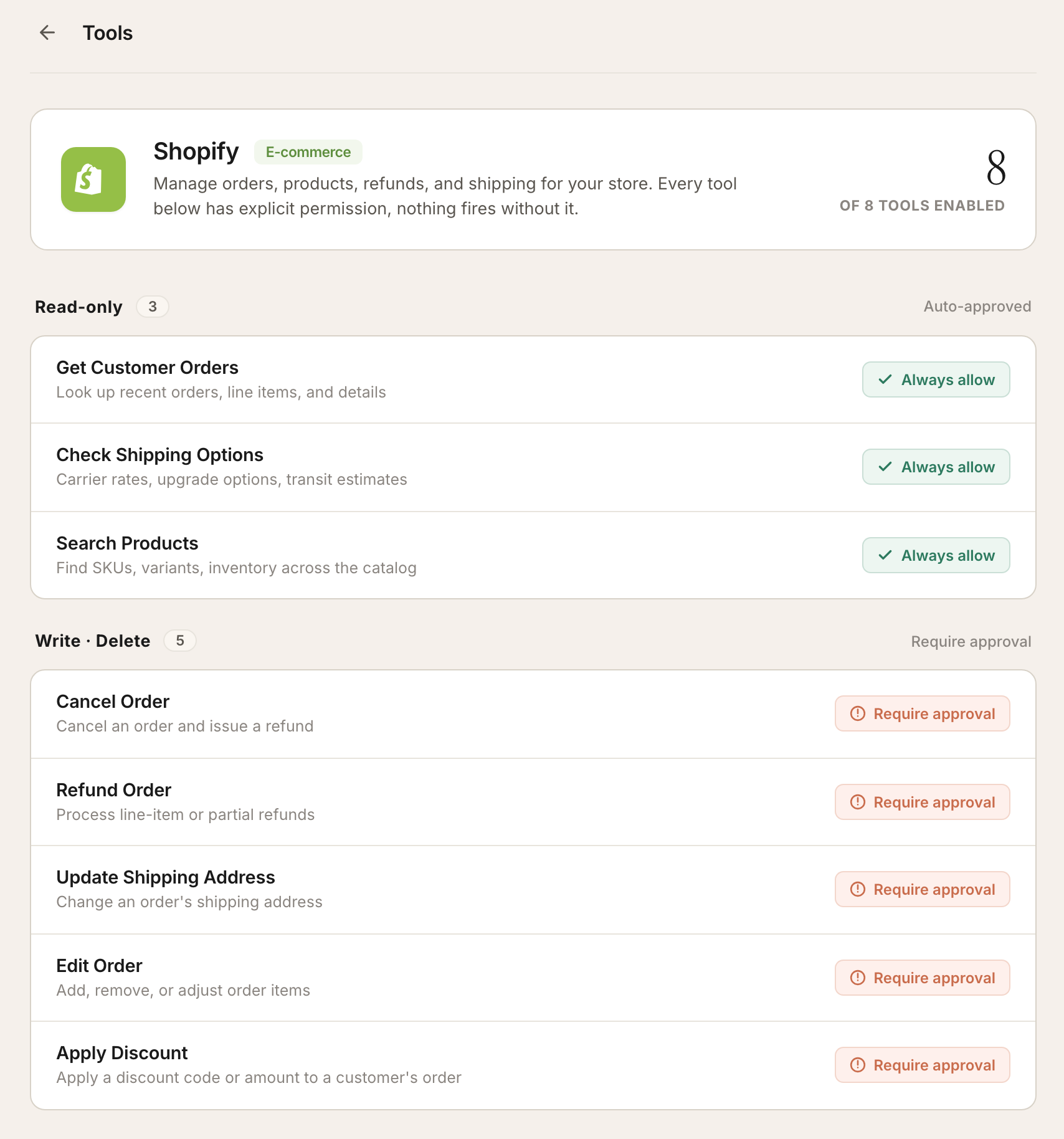
Every action has its own permission on the Tools page: Always allow, or Require approval. Set Refund Order to Require approval, and each refund waits in the inbox for one click from a person.
An action with no permission set waits for approval by default. In Co-Pilot mode, every customer-visible action waits, whatever its permission says.
The Shopify tools page. Lookups run on their own. Cancel, refund, address, edit and discount wait for a person.
What the customer hears while a refund waits
The AI tells the customer the refund is under review. The amount, the payment method and the payout window stay out of that reply.
Those details go in an internal note for the approver. Once a person approves, the AI confirms the outcome to the customer.
Can the AI say a refund is done when it is not?
No. A reply that says a refund went through is held unless a refund action actually succeeded in that conversation. An approval that is still pending does not count.
The check reads the meaning, not one phrase. "Your money is on its way back to your card" is held the same way as "I processed your refund."
Store credit or a swap before cash back
Your policy can offer store credit first. The refund action supports original payment, store credit, or both in one refund.
Before an order ships, a wrong size or color is a swap on the same order, not a refund. See editing an order.
When the AI hands a refund to your team
Without a policy that covers it, the AI does not refund. These go to your team by default:
- Goodwill refunds nobody authorized
- Missing parcels and delivered-but-not-received claims
- Disputes over a subscription order that already shipped
- Return-label exceptions
- Any refund request where the amount or the order is unclear
A hand-off takes three steps. The AI saves an internal note with the reason. It sends the customer one reply on what happens next. The conversation stays open for your team.
If your playbook names a hand-off mode, the AI switches the conversation to Manual or Co-Pilot. No further AI reply then goes out on its own.
Which systems the refund runs in
| System | Refund action |
|---|
| Shopify | Full, partial, line-item or store-credit refund on an order |
| Shopify | Refund of the payment while cancelling an unshipped order |
| Recharge | Refund of one subscription charge |
| CheckoutChamp | Refund of an order, or the latest subscription charge |
| Richpanel Returns | Refund of an approved return, after the itemised estimate |
Every other AI action, and how each is controlled, is on the AI actions overview.
Where these facts come from.
- Richpanel AI action catalog, as of September 24, 2026. The list of actions the AI agent can call, with each action's inputs, preconditions and default permission. Every capability on this page maps to a named action in it: refund_order, cancel_order, refund_recharge_charge, refund_checkoutchamp_order, refund_checkoutchamp_charge, get_richpanel_estimated_refund and process_richpanel_return_refund.
- Richpanel AI safety. The five safety layers, including sensitive-action guardrails, tool permissions and QA AI review of every conversation. richpanel.com/ai-safety
Version history. v1.0 (2026-09-24): initial publication. Every action on this page is checked against the Richpanel AI action catalog as it stood on the publication date.